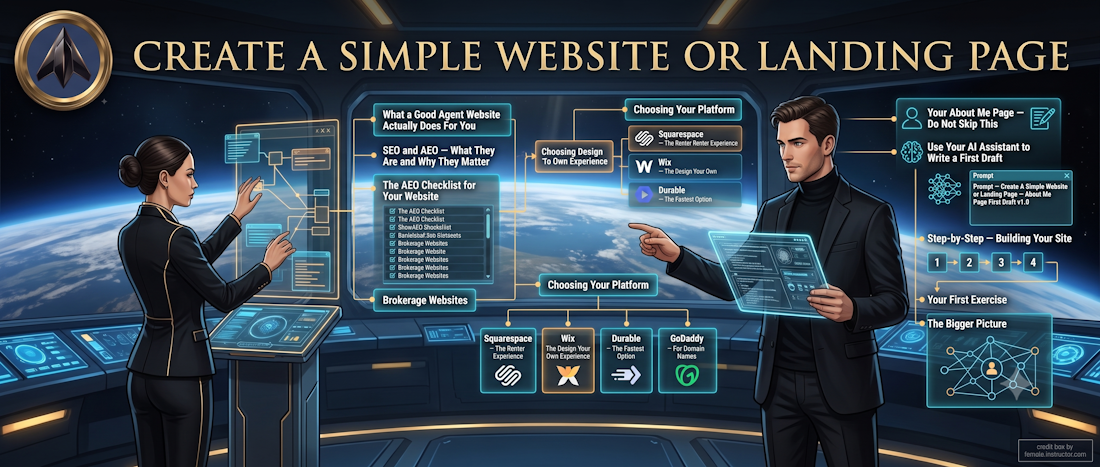
Create A Simple Website or Landing Page
Introduction
Not every agent needs a full blown website right away — and not every project needs one either. This lesson is for the agent who wants a clean, professional online presence without the full IIA Website build, and for any agent who wants to create a fast landing page for a specific purpose — a listing, a neighborhood, an Open House, or a lead capture page. If you are building your IIA Website, this lesson is still worth reading for those times when you need something quick and standalone.
From adding a single webpage to building an entire website, this skill will serve you well. There are over 3 million licensed agents in the U.S., and only about half are REALTORS® with access to MLS-provided tools. Many agents are starting with absolutely nothing.
Whether you are building your very first digital business card or a custom site to market a luxury listing, knowing how to spin up a webpage quickly is a superpower. And in the world we are living in right now, it is not optional.
What a Good Agent Website Actually Does For You
Before we talk about how to build a website, let's talk about why. Because a lot of agents build a website, put it up, and then wonder why nothing happens. The website was not the problem. What the website said — and who it was talking to — was the problem.
A good agent website does four things. It tells people who you are. It tells them exactly what you specialize in. It gives them a reason to contact you. And it proves to Google and every AI search engine on the internet that you are a real, consistent, credible authority in your specific market.
That last one is the one most agents miss entirely. And it is the most important one right now.
Your website is your real estate business on the internet. Everything else you have built — your handle, your Google Business Profile, your social media, your content — points back to it. When all of those arrows point at the same place and say the same thing, the internet starts paying attention to you in a way that no amount of paid advertising can buy.
SEO and AEO — What They Are and Why They Matter
SEO stands for Search Engine Optimization. It is the technology used by websites to be found by search engines. The better your SEO, the higher your website ranks in search results. It is still important for websites, but now there are AI Search Engines that work differently.
AI Search Engines let users type in the search bar or use voice commands in natural language. The AI search results bypass the list of websites entirely, bringing the user a direct answer.
When you ask any Apple device, ChatGPT, Gemini, Perplexity, or even Google's AI Overview a question, you are not getting a list of links anymore. You are getting a direct answer. The AI has already decided who the authority is, and it is telling you. That is an answer engine. And the agents who show up in those answers are the ones who have built a consistent, specific, credible presence across the internet — starting with their website.
Here is why this matters to you right now. When someone asks an AI "who is the best real estate agent for first-time buyers in Your Town, Your State," the AI is not guessing. It is pulling from everything it has already indexed — websites, Google Business Profiles, social media, reviews, content, and how consistently all of those sources agree with each other.
If your website says one thing, your Google Business Profile says something different, and your social media says something else entirely, the AI cannot figure out who you are or what you specialize in. It moves on to the next agent.
But if everything says the same thing — your niche, your market, your name, your specialty — the AI starts treating you as the answer to that question. That is AEO. And it starts with your website.
The AEO Checklist for Your Website
— Your niche is stated clearly on your homepage — not buried, not vague.
— Your market area is named specifically — city, neighborhood, or region.
— Your name appears consistently and exactly as it does everywhere else on the internet.
— Your website links to your Google Business Profile, your social media, and your content.
— You publish content regularly — even short posts — that speak directly to your niche client.
Brokerage Websites
Most brokerages give you what is called a subdomain. That is a web address that looks something like this: brokerage.com/agent/yourname. It is free, it is easy, and it feels like a website. But it is not yours.
If you leave that brokerage — and most agents change brokerages at least once in their career — you lose that page. Every Google review that pointed to it, every link anyone ever shared, every piece of SEO you built up over months or years. Gone.
The solution is simple. Build a website that you own. It does not have to be complicated. It can be just your photo, your bio, your niche, and a Search for Homes button that links to your brokerage site. When you change companies, you just update that one link. Your website, your handle, your Google reviews, and everything you have built stays exactly where it is.
Choosing Your Platform
You no longer need to know how to write code to build a professional website. Most modern builders now use AI generation. You type something like "I am a real estate agent in Your Town, Your State, specializing in first-time buyer homes. Build me a site with a contact form and an About Me section," and the AI builds it in about 60 seconds. You then customize it to match your brand.
The main platforms for simple websites and landing pages are Squarespace, Wix, Durable, and GoDaddy. Here is an honest comparison so you can choose the one that fits how you work.
Squarespace — The Renter Experience
Think of Squarespace like renting a beautifully designed apartment in a well-managed building. Everything is taken care of for you. You just move in and make it yours.
— Setup: Sign up and start building. High-quality hosting and security are included in the price. Nothing to install or configure.
— Design: Award-winning templates that look polished and professional by default. Their Blueprint AI Builder drafts your entire site through a simple chat conversation.
— SEO and AEO: Built-in and automatic. Squarespace has specifically optimized its platform for AI search engines, which makes it a strong choice for agents focused on AEO right now.
— The Break Factor: Near zero. Squarespace manages all the technical maintenance so your site stays up and runs smoothly.
You do not own the platform. If you stop paying your monthly fee, your site goes offline. You are on their platform, not your own server. That said, you can always export your content if you decide to move. For most agents starting out, the tradeoff is worth it.
Squarespace — Squarespace YouTube
Wix — The Design Your Own Experience
Wix sits between WordPress and Squarespace in terms of flexibility. It is a fully hosted platform — meaning nothing to install, no maintenance to manage — but it gives you more drag-and-drop control over exactly where elements sit on the page. If you are someone who wants to move things around freely and see the result in real time without touching any code, Wix feels very natural.
— Setup: Sign up and start building. Hosting and security are included. Wix ADI (Artificial Design Intelligence) can build a starter site for you based on a short questionnaire.
— Design: Extremely flexible layouts. You can place any element anywhere on the page. More creative control than Squarespace, though it requires a little more time to get a polished result.
— SEO and AEO: Solid built-in SEO tools. Not quite as streamlined as Squarespace for AEO, but fully capable when set up correctly.
— The Break Factor: Low. Like Squarespace, Wix handles the technical side for you. One note — once you choose a template in Wix, you cannot switch to a different one without rebuilding your content. Choose carefully at the start.
Durable — The Fastest Option
Durable builds a full website in 30 seconds from a single sentence. Type your name and your niche and it generates a complete starter site instantly. Free to try, no credit card required.
Durable — Durable YouTube — Search "Durable AI website builder" on YouTube for tutorials.
GoDaddy — For Domain Names
GoDaddy is straightforward for purchasing domain names — your address on the internet. For building websites, the options above are stronger. But if you need a domain name fast, GoDaddy gets it done.
Your About Me Page — Do Not Skip This
The About Me page is one of the most visited pages on any real estate agent's website. People want to know who they are about to trust with one of the biggest financial decisions of their life. And most agent About Me pages say almost nothing useful.
Here is what yours needs to include:
— Your niche — stated clearly. Not "I help buyers and sellers." Tell them exactly what you specialize in and exactly where.
— Your community connection. How long have you lived there? What do you know about this market that someone from out of town would not know?
— Your charity or cause. This is where people connect with you as a human being, not just an agent.
— A short personal note. Family, hobbies, what makes you you. Keep it brief but real.
— A direct call to action. Tell them exactly what to do next. Schedule a call. Send a text. Fill out a form. Do not make them guess.
Use Your AI Assistant to Write a First Draft
Open your AI Assistant and use this prompt:
Prompt — Create A Simple Website or Landing Page — About Me Page First Draft v1.0
[PROMPT START]
Act as a real estate copywriter. Write an About Me page for my real estate website. My niche is [your niche]. My market is [your city]. Keep it warm, specific, and under 200 words. Do not use phrases like 'passionate about' or 'dream home.' End with a clear call to action that tells the visitor exactly what to do next.
[PROMPT END]
Read it out loud. Fix anything that does not sound like you. Add your charity. Add your personal note. Make it yours.
Step-by-Step — Building Your Site
— Define your goal. Is this a general business site, a neighborhood expert page, or a single property site? Write it down in one sentence before you open any website builder.
— Register a domain name. Your domain name is your address on the internet — for example, YourNameRealEstate.com. For a listing, buy the street address. For your main site, try to get your name. I use Cloudflare because there is no markup on the domain name — every year it will cost the same to maintain it.
— Choose your platform. Use the comparison above to decide. If you are not sure, start with Squarespace or Durable — both are fast and forgiving.
— Use AI to build your first draft. Type your niche, your market, and what you need the site to do. Let the AI build the structure. You customize from there.
— Write your About Me page. Use the prompt above. This is not optional — it is one of the first things both visitors and AI search engines look at.
— Add the content that makes you sticky. A weather widget from WeatherWidget.io is great for neighborhood pages — it keeps people on your site. Embed your YouTube bio video or a property tour. Add your Google review link.
— Check your mobile view before you publish. The majority of your traffic will come from a phone. Every builder has a Mobile View option — use it. If something looks wrong on a phone, fix it before anyone sees it.
— Connect everything. Link your website to your Google Business Profile, your social media profiles, and your email signature. Every connection strengthens your AEO signal.
— Publish and tell people. Post about your new site. Add the link to every profile you own. Send it to your sphere of influence. A website that nobody knows about does not exist.
Your First Exercise
Go to Durable.co — it is free to try. Type in your name and your niche. Watch it build a website in 30 seconds.
You do not have to keep it. You do not have to pay for anything. But do this exercise, because it will show you something important — the technology is not the obstacle anymore. The only thing standing between you and a professional online presence is the decision to build one.
The Bigger Picture
Every agent who is going to be in business five years from now is going to be findable, specific, and consistent across the internet. The ones who are not will wonder why their phone stopped ringing. You are in this training because you want to be ahead of that curve. This lesson is where that starts. Build the site. Connect the dots. Let the internet go to work for you.
Good job! One more way you own your name on the internet instead of renting it from someone else.
Return to Your Dashboard
Create A Simple Website or Landing Page | Version 1.0 | April 6, 2026
 Cypher